

Personalizing your virtual identity has never been more crucial in today’s fast-paced digital world. Snapchat, a leading social media platform, offers endless possibilities to customize your online persona. This article dives into the simple steps to change your gender on Snapchat, ensuring your virtual reflection mirrors your real-world self. Stay tuned to master the art of personalizing your Snapchat experience.
To change your gender on Snapchat, open the app, tap your profile icon, select ‘Edit Bitmoji,’ choose ‘Change My Bitmoji Selfie,’ and select a gender.
Don’t stop here! Keep reading to uncover more tips on enhancing your Snapchat journey. We’ve got you covered, from tweaking your Bitmoji to personalizing your AI chatbot. Dive in and transform your Snapchat game today!
See Also: Why Snapchat Won’t Download On My iPhone? Fixed
How to Change Gender on Snapchat Android
Changing your gender on Snapchat is a breeze, especially if you’re an Android user. Here’s a step-by-step guide to help you navigate through this process:
- Open Snapchat: Launch the Snapchat app on your Android device. Make sure you’re logged in to your account.

- Access Your Profile: Tap on your profile icon in the top-left corner of the screen. This will take you to your Snapchat profile.
- Edit Bitmoji: Look for the ‘Edit Bitmoji’ option under your Bitmoji avatar. Tap on it to proceed with the customization.
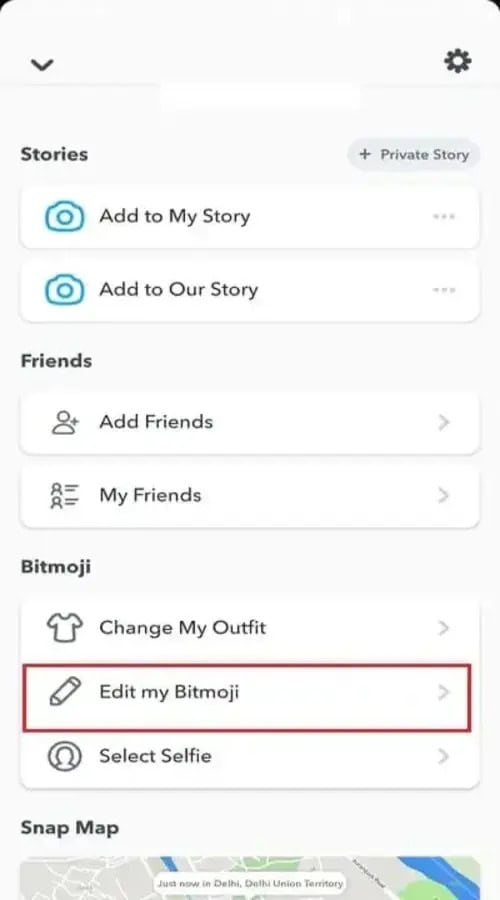
- Select Gender: Once you’re in the Bitmoji editor, you can change your gender. Choose the gender you identify with or prefer for your Bitmoji.
- Customize Further: After selecting your gender, explore other customization options. You can change your Bitmoji’s hairstyle, outfit, and other features to match your style. You can also learn how to change username on snapchat.
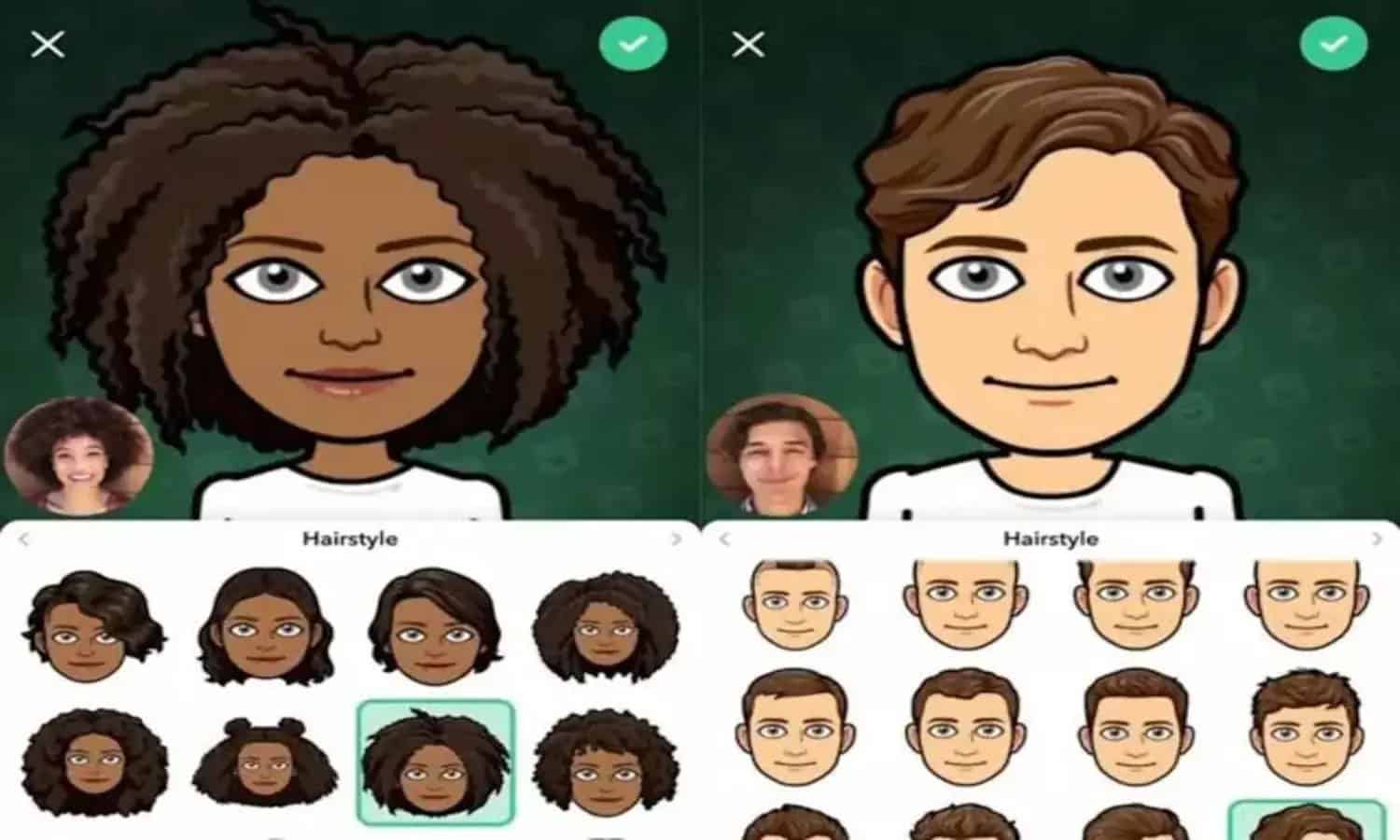
- Save Changes: Once satisfied with your new look, tap ‘Save’ to update your Bitmoji. The Snapchat platform will reflect the change in your gender.
- Enjoy Your New Avatar: Returning to your profile or chat to see your updated Bitmoji. Share snaps and stories with your new look and enjoy your personalized Snapchat experience. You can also learn How To Put A Snapchat Filter On A Photo Click here to know more.
How Do I Edit My Bitmoji?
Editing your Bitmoji on Snapchat is a fun way to keep your virtual avatar fresh and representative of your current style. Whether you want to change your outfit, hairstyle, or facial features, Snapchat’s Bitmoji editor covers you. Here’s how you can edit your Bitmoji:
- Open Snapchat: Start by launching the Snapchat app on your device. Make sure you’re logged in to your account.
- Access Your Profile: Tap on your profile icon, usually found in the top-left corner of the screen, to open your Snapchat profile.
- Edit Bitmoji: Look for the ‘Edit Bitmoji’ option beneath your Bitmoji avatar. Tap on it to enter the Bitmoji editor.
- Explore Customization Options: In the Bitmoji editor, you’ll find various customization options. You can change your Bitmoji’s hair color, skin tone, eye shape, clothing, and more. Changing your Bitmoji color on Snapchat is a fun way to personalize your avatar.
- Try on New Looks: Feel free to experiment with different looks and styles. The editor offers many options to ensure your Bitmoji reflects your personality. This is how to change gender on snapchat.

- Save Your Changes: Once satisfied with your new look, tap ‘Save’ to update your Bitmoji. Snapchat will apply any changes you make immediately across your account.
- Show Off Your New Bitmoji: Head back to your profile or start a chat to see your updated Bitmoji. Share snaps and stories featuring your revamped avatar and enjoy the reactions from your friends. You can also check out apps like snapchat.
FAQs
Can I change my Snapchat Bitmoji from male to female?
Yes, you can change your Snapchat Bitmoji's gender by resetting your avatar in the Bitmoji app. Start by unlinking your current Bitmoji in Snapchat or the Bitmoji app, then create a new one with your desired gender.
How do I access the gender swap filter on Snapchat?
To use the gender swap filter, press and hold your face on the camera view in Snapchat. The filter options will appear; swipe through them to find the gender swap filter, symbolized by male to female or female to male icons.
Can Snapchat's gender change be reversed?
Absolutely! You can reverse the gender change on Snapchat by either selecting a different gender when resetting your Bitmoji or using the gender swap filter again to change your appearance back.
Is there a non-binary option for Snapchat avatars?
While Snapchat doesn't offer a specific non-binary Bitmoji avatar, you can customize your avatar with a mix of features, clothes, and accessories to represent your identity more accurately.
Why can't I find the gender swap filter on Snapchat?
If you're having trouble finding the gender swap filter, ensure your app is updated. If the issue persists, the filter might be temporarily unavailable or hidden; try searching for it in the filter search bar or wait for it to reappear.
Conclusion:
In summary, changing your gender on Snapchat can easily be achieved through your Bitmoji settings or by utilizing the gender swap filter. Whether updating your Bitmoji in the Bitmoji app or directly on Snapchat, these simple steps ensure your Snapchat avatar accurately reflects your identity.
See Also: How to get Snapchat on a Chromebook ?

Introducing TechiePlus’s all-in-one Editor, Olivia, based in London. From headphones to music streaming, she’s got you covered.